
While your AP vendor may try to convince you otherwise, at this time, investing in multi-Gbps Ethernet access point connections is a terrible waste of money. Please do not believe that it is required in order to reach incredible speeds. Reality is very far from this. Here’s why:
- Maximum speeds that are advertised are calculated with 80 and 160 MHz channel widths, which are not useful on enterprise networks, which typically use 20 MHz or 40MHz channels. This alone drops your maximum rates per AP to 50% or 25% of the advertised rates.
- Maximum advertised speeds do not consider 802.11 protocol’s overhead. Not all data is user content. Ethernet protocol efficiency is above 95%. For Wi-Fi its around 60-70% depending on the generation.
- Maximum speeds also assume that maximum data rates are used all the time. This happens only when very close to an AP and in an environment with no interference, which is uncommon. In general, most Wi-Fi traffic will use significantly lower rates. This easily drops data rates by 50-75%.
- Maximum advertised speeds assume that no retries are needed. However, retry rates in today’s networks vary between 10%-60%.
- Wi-Fi transmitters and receivers operate at the same frequency. Often there is more downlink traffic than uplink. A good assumption is 2/3 traffic is downlink and 1/3 uplink, so this reduces downlink to 66% of the maximum possible throughput.
- The air is a shared resource and there is always overlap with traffic on the same channel between APs. To make a channel busy for an 802.11ac AP/client, it’s enough that the radio detects a packet header coded with a 6 Mbit/s rate on the same channel. This is a robust rate and reaches quite far, beyond the usable Wi-Fi range. However, this drops the available airtime for each individual AP. The wider the channel used, the smaller the reuse factor and the great the contention for available airtime.
- Fundamentally, network dimensioning should not be done based on peak throughput values. Let’s assume you dimension a 500 AP network based on peak values: If you have 1 Gbps per AP and you have 50 APs connected to switch, then you need a 50 Gbps switch to each floor. If you have ten-floor building feeding to the next switch, then you need 500 Gbps of capacity for this building alone. This does not make sense. There is no such equipment available. It’s simply not appropriate to dimension the network by adding up all elements maximum speeds. This table is a good reference. It shows the calculation of real maximum user payload throughput in an enterprise environment.
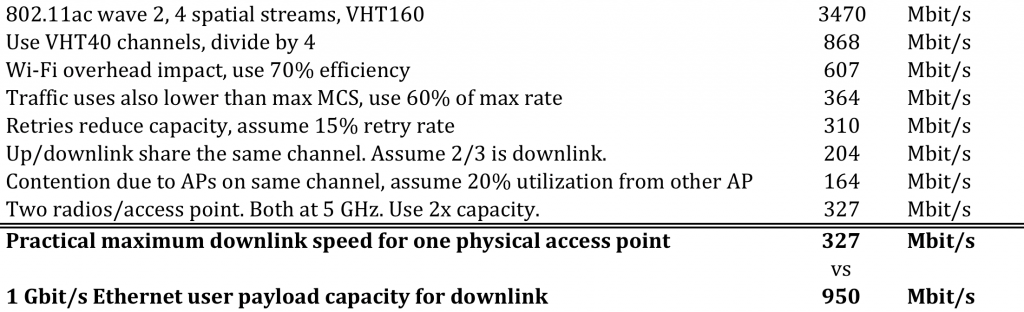
As you can see, the maximum practical end user data throughput capacity that one access point has, is around 300-350 Mbit/s. But 1 Gbps Ethernet provides 950 Mbit/s capacity. So you can see that it’s not anytime soon that you need more than one gigabit Ethernet link to your access point. Please do not let anyone trick you into thinking you need something that is clearly not necessary in practice.
To summarize, please avoid making these mistakes when evaluating whether to upgrade your WLAN:
- Replacing your equipment without evaluating the network design will likely not remove your problems.
- Not hiring a skilled independent party to assess your design and optimize your existing network. When you acquire network design and equipment from separate providers, you’ll get the best outcome. Always perform post install validation and survey. If you have performance management system in place, you can actually quantify the performance improvement you get and optimize network with the data.
- Not basing your WLAN optimization plan on factual data describing how your current network is performing, along with a list of the trouble spots and bottlenecks. You need this data in order to understand what problem your new equipment is supposed to solve. You may need a new router or firewall, a faster Internet connection, more Radius or DHCP capacity - but not new Wi-Fi network. Use and trust the data to make fact-based decisions.
In order to make a fact based decisions, you need sufficient data. You need a product, which collects Wi-Fi performance data and points out the bottlenecks and issues in your whole network. 7SIGNAL Sapphire and Mobile Eye performance management products can help you here. Performance optimization may resolve your issues. You will get to know if you need to make an investment and what investment you need. After to you have upgraded, you can immediately see if your investment paid off.